TikaSpeaker Bureau

TikaSpeaker Bureau (includes company-run events).

Speaker Bureau Software for Pharma

Every company-run program, every speaker contract, every payment checked against the cap before it goes out.

Speaker bureau software is how a pharma or medical device company runs HCP speaker programs: who is qualified to speak, which event they are on, what honorarium they are owed, and whether that payment is still inside the Fair Market Value (FMV) cap. TikaSpeaker Bureau is that system for Medical Affairs and Commercial teams. A program moves from planned to evaluated on one record. The contract, the training, and the invoice sit on the speaker. Finance sees the cap before the payment is approved.

TikaSpeaker Bureau includes company-run events: dinner programs, advisory boards, grand rounds, and other HCP events the company hosts. Session coverage at a scientific congress is handled in TikaConference.

Speaker & FVM image-1

TRUSTED BY LEADING PHARMACEUTICAL AND MEDICAL DEVICE COMPANIES


The program, the speaker, and the payment are one record

Speaker programs break in the handoff. The event is in one sheet, the contract is in email, and the honorarium is calculated again when finance asks whether this HCP is already near the annual cap. By the time someone checks, the invoice has been approved.

TikaSpeaker Bureau keeps the event, the speaker, and the money on one record. Status, attendance, contract, training, invoice, and the cap are visible to the person who needs them, in the role they have.

Speaker bureau management, from the contract to the payment

Plan
1

Plan

Create the event, assign the speaker, and set the agenda. Status starts at Planned.

Onboard
2

Onboard

Training, contract, and e-signature are recorded on the speaker before they take the podium.

Run
3

Run

Attendance is captured. The event moves through Confirmed and Completed.

Evaluate
4

Evaluate

A structured rating after the program, so quality is comparable across events.

Pay
5

Pay

Honoraria and travel calculate from the completed event. The speaker confirms the invoice. Finance approves it against the cap.
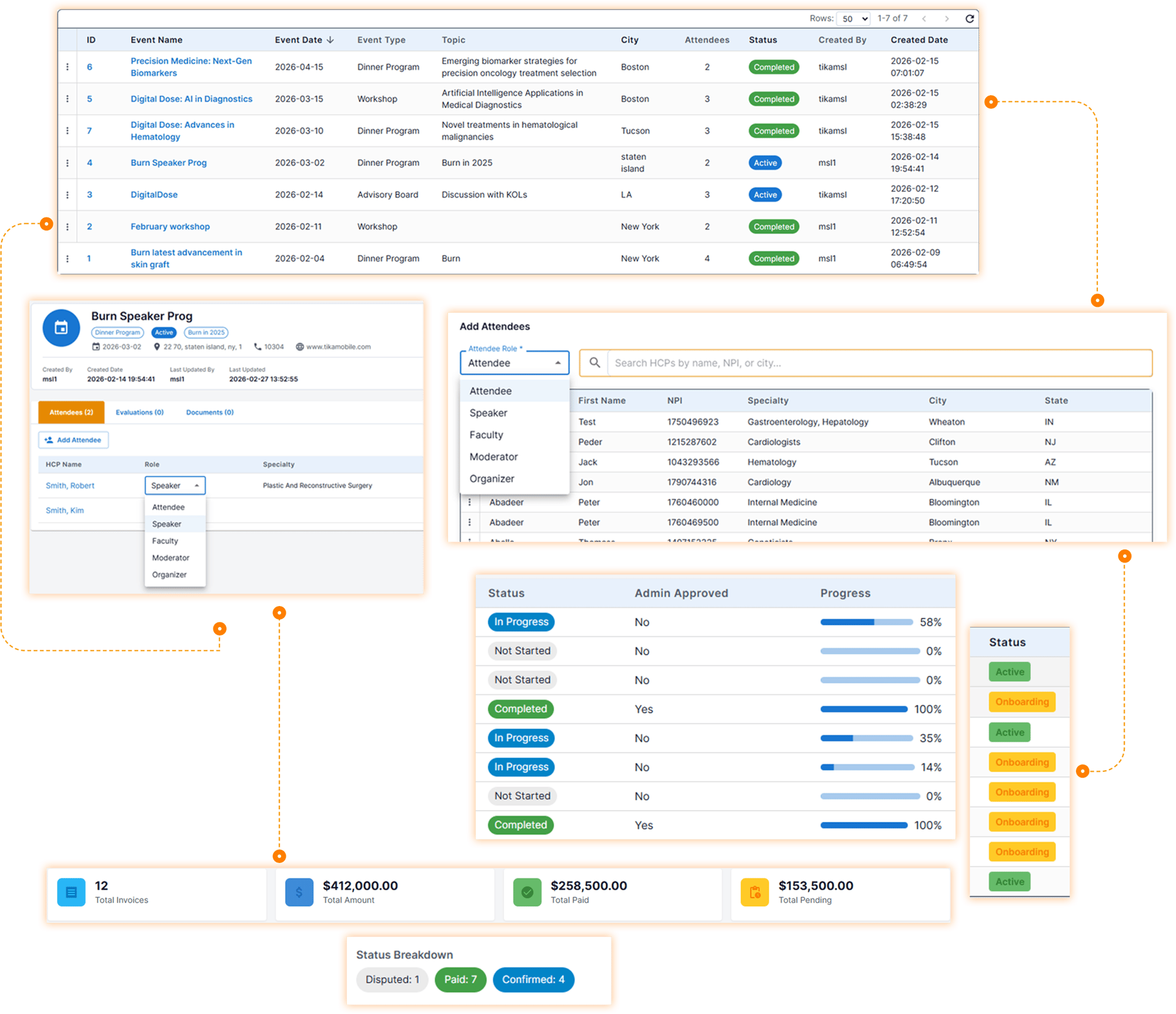

Event lifecycle view v2-1

Medical event management for the programs the company hosts

Tick-round

One status for every program

Each event moves through Planned, Confirmed, Completed, and Evaluated. The list is the program calendar, not a spreadsheet with a different legend in every region.

Tick-round

Who was in the room

Attendance is recorded by territory. The HCP on the sign-in sheet is the HCP on the profile, so a later payment or a later program does not depend on retyping the name.

Tick-round

Whether the program was any good

After the event, a structured rating scale records quality the same way for every program. The score stays on the event.

Tick-round

The file stays with the event

Agendas, sign-in sheets, slides, and materials sit on the event, with versions. The deck and the attendance list are not in two inboxes.

Tick-round

Types the company actually hosts

Dinner programs, advisory boards, grand rounds, and other HCP events the organization configures, for Medical Affairs and for Commercial. Labels and steps can match the company’s own names. Session coverage at a scientific congress stays in TikaConference.

A speaker is qualified before they are booked

Tick-round

One profile

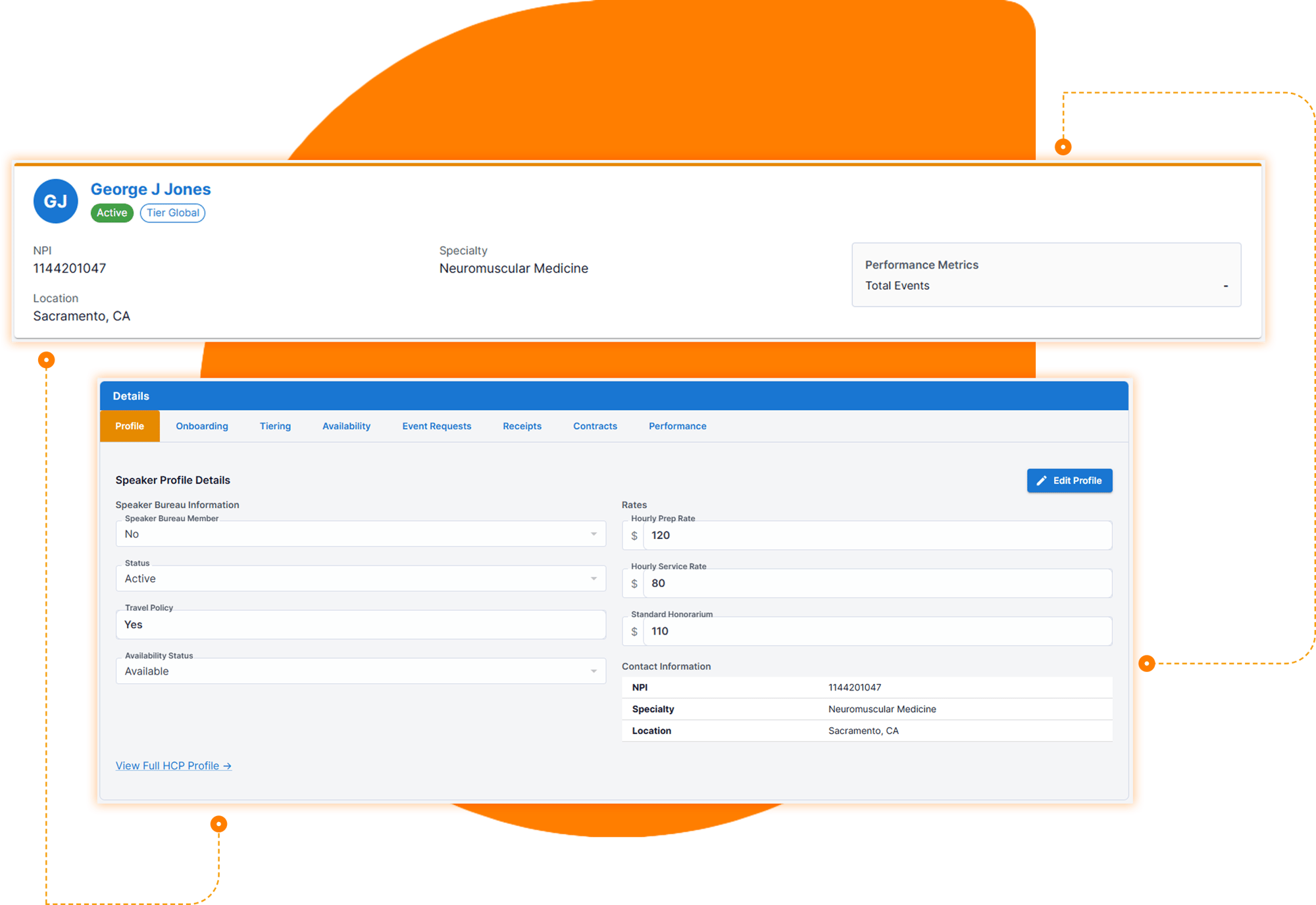
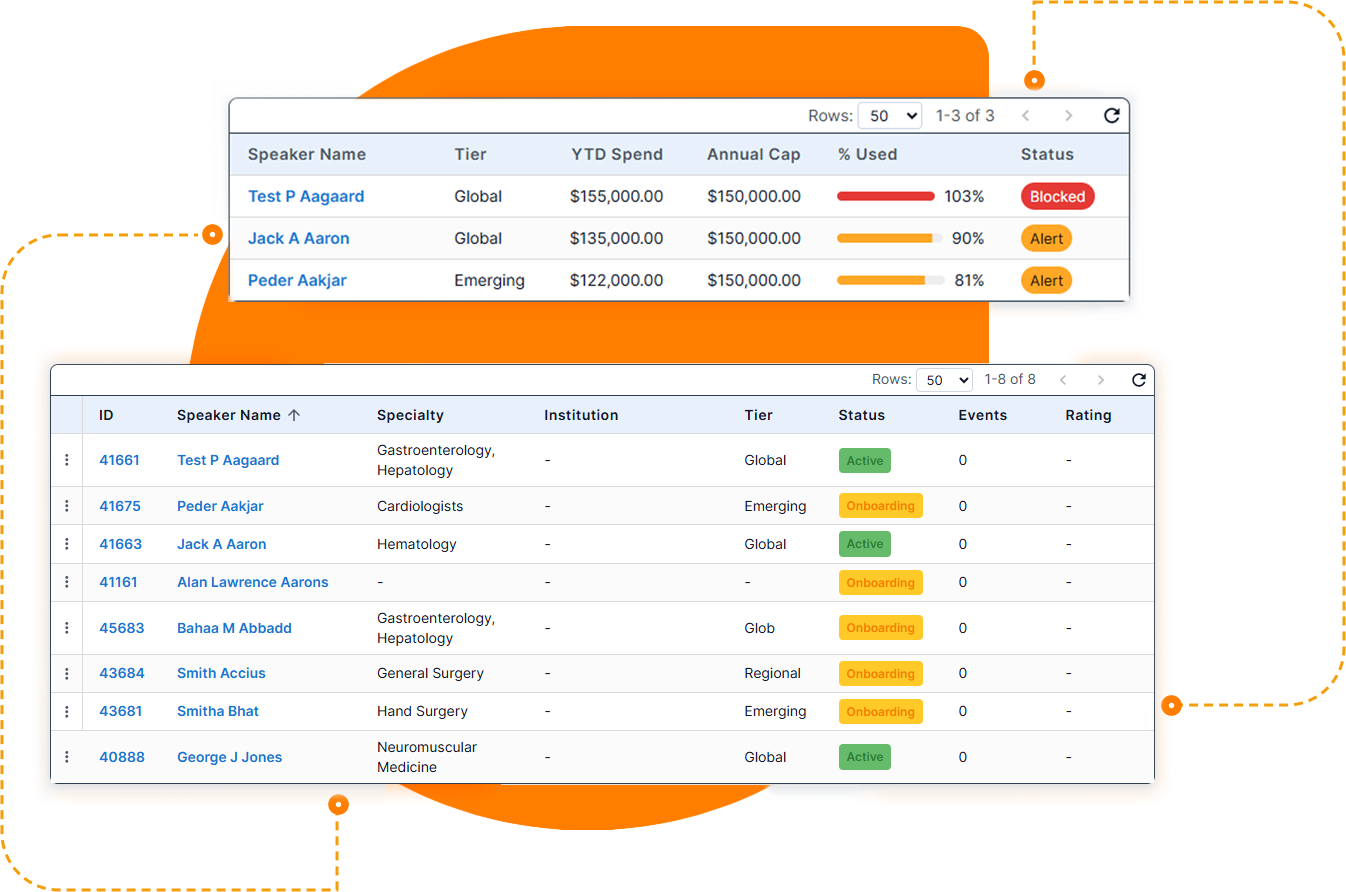
Credentials, specialty, KOL tier, and compliance status are on one searchable profile. Filter by specialty, tier, geography, availability, and whether they are cleared to speak.

Tick-round

Onboarding before the first program

The workflow records the background check, training, contract, and compliance clearance. TikaSpeaker Bureau stores that those steps are done. It does not replace the vendor that runs a background investigation.

Tick-round
Tick-round

Contract and signature

Generate the contract and collect the signature in the product, or through DocuSign or Dropbox Sign. The signed contract stays on the speaker.

Tick-round

Training does not quietly expire

Completions, certifications, and recertification dates are on the profile. An alert fires before a speaker drops out of compliance, not after they have already been paid for a program.

Speaker Bureau and Onboarding

SpeakerBureau-InvoiceIsCalculated


The invoice is calculated from the event, then the speaker confirms it

Tick-round

Honoraria from the hours on the event

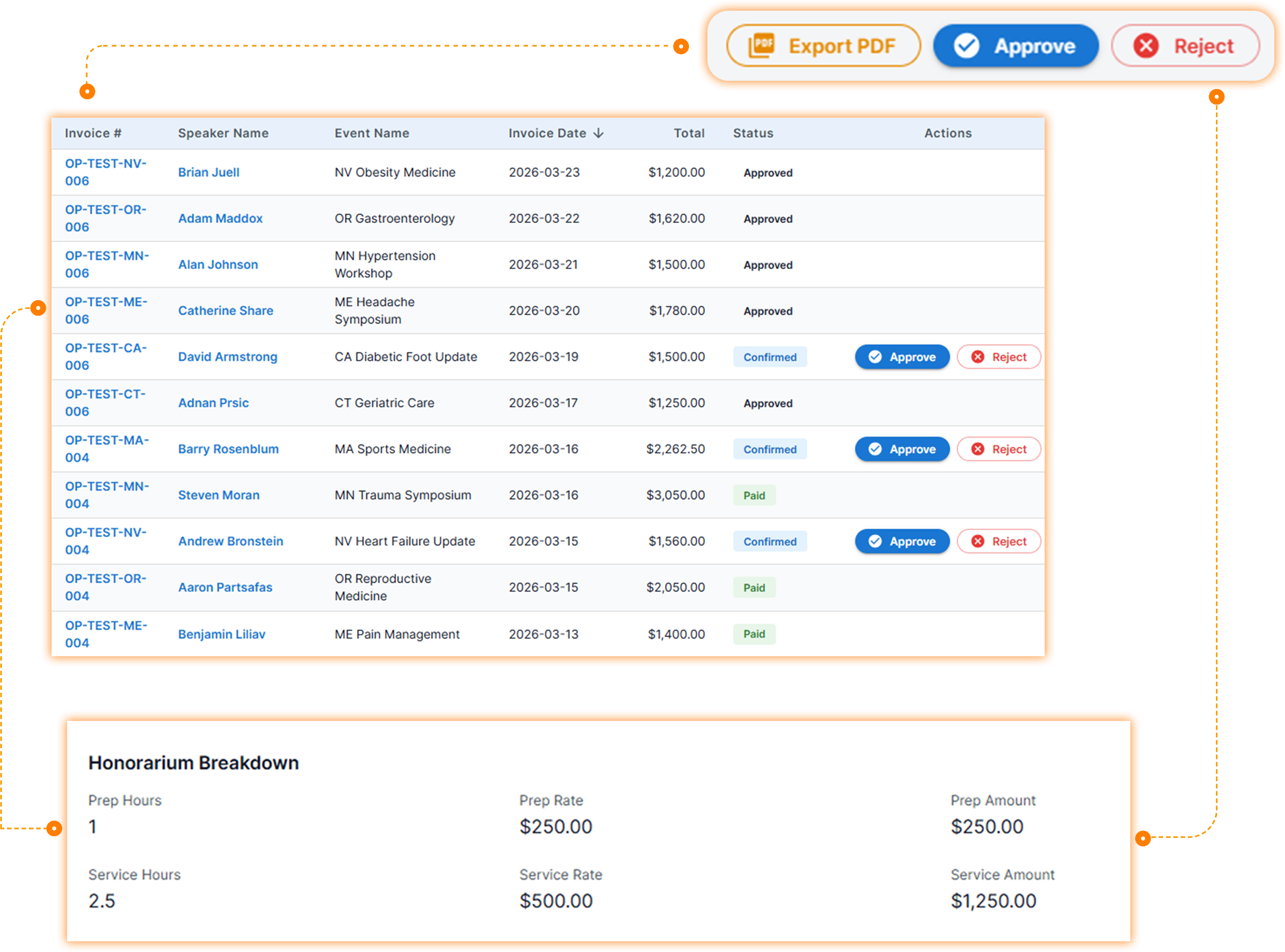
A completed event can generate the invoice in one action: preparation hours and service hours at the contracted rate, plus travel. The amount is not retyped into a second spreadsheet.

Tick-round

The speaker sees it

The HCP portal lets the speaker review the invoice, confirm it, or dispute it. They get an email when it is ready. Payment status is visible to them. The chase by phone and PDF is the step this removes.

Tick-round

Finance approves with a reason

Finance reviews, approves, or rejects, and the reason is stored. The payment dashboard shows what is invoiced, what is paid, and what is still pending.

Tick-round
Tick-round

A PDF for the file

The invoice exports with its status, for the record finance already keeps.

The cap is checked before the payment, not at the end of the quarter

This is the compliance that ships. CMS Open Payments export, EFPIA disclosure files, and state transparency reports are not in the product yet.

Tick-round

Where each speaker stands

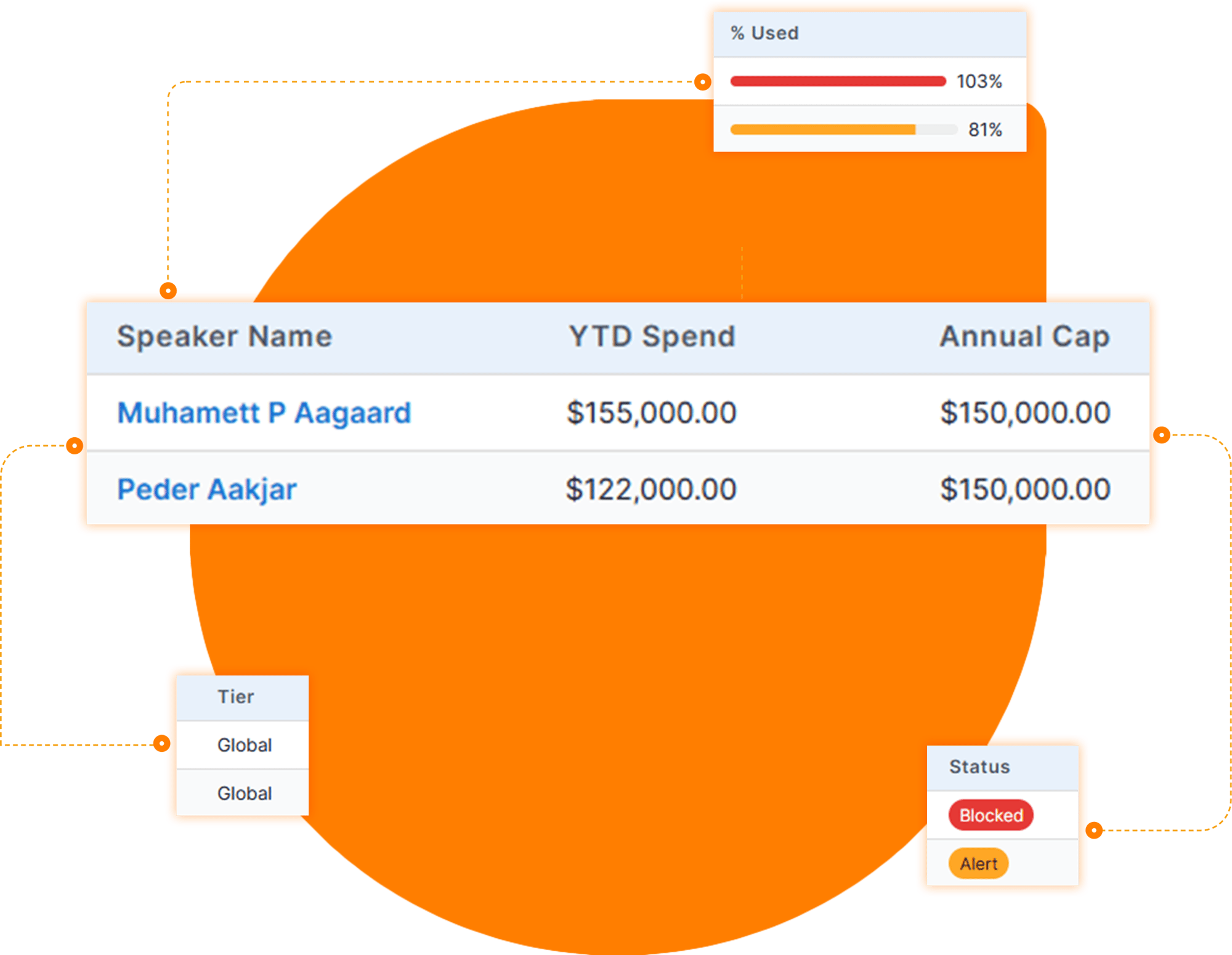
The FMV dashboard shows each speaker against the cap, with the amount already committed visible before the next approval. Each payment is a transfer of value counted against that cap.

Tick-round

Caps by tier

Set annual, quarterly, and per-event caps for Tier 1, Tier 2, and Tier 3. The limits are the company’s.

Tick-round

Warning, then a stop

At 80 percent of a cap, the platform warns. At 100 percent, it blocks the payment. The violation is stopped at approval, not discovered in a quarterly audit.

Tick-round

An exception is a decision, not a workaround

A payment past the cap requires an exception. A compliance officer reviews it. The request and the decision stay on the record.

Tick-round
SpeakerBureau-CapIsCheckedBeforePayment

AI drafts the readout and watches the dates

Two uses, both tied to a record that already exists.

After the program, AI drafts a post-event report and an insight summary from the event, the attendance, and the evaluation. Sentiment on the feedback already captured is part of that readout. A person decides what gets sent. The draft can be compiled for the stakeholders who were not in the room.

Separately, alerts watch the dates and the caps: training about to expire, a compliance deadline, a speaker approaching the FMV threshold. The 80 percent warning is a rule on the cap. The report is a draft. Neither one approves a payment or clears a speaker.

See the program, the speaker, and the payment on one record

Book a walkthrough of TikaSpeaker Bureau.

Program owner, speaker, finance

Program owner

Builds the event, assigns a cleared speaker, and can see which programs are still Planned.

Speaker

Signs the contract, then confirms or disputes the invoice in the portal without sending a PDF back.

Finance and compliance

See the cap before approval, the 80 percent warning, the hard stop at 100 percent, and the exception if someone needs to go past it.

Access follows the role: MSL, regional director, power MSL, admin, and finance, limited by territory. Every change to an event, a contract, an invoice, or an exception is logged with the person and the time. Field teams can open the event and the speaker on the mobile app.

What to evaluate in speaker bureau software

A speaker-bureau tool has to control the payment, not only list the events.

01

The event, the speaker profile, the contract, and the invoice are one record.

02

A speaker can be filtered by specialty, tier, and whether they are cleared.

03

The invoice is calculated from preparation hours, service hours, and travel on the completed event.

04

The HCP can confirm or dispute that invoice without email.

05

Annual, quarterly, and per-event caps are enforced, with a warning at 80 percent and a block at 100 percent.

06

An exception has an owner and a recorded decision.

07

Training expiry is visible before the speaker is booked again.

08

The audit log shows who changed a contract, an invoice, or a cap.

Ask any vendor to show a speaker at 80 percent of the annual cap and attempt the next payment.

A demo that only shows a finished dashboard is showing the report, not the control.

Questions teams ask before they choose

TikaSpeaker Bureau

What is speaker bureau software for pharma?

Speaker bureau software is the system a pharmaceutical or medical device company uses to run HCP speaker programs: qualifying speakers, contracting them, holding the event, calculating honoraria, and keeping each payment inside a Fair Market Value cap. The search is for pharma speaker programs. A keynote agency is a different business.

What should speaker bureau software include?

It should hold the event, the speaker’s credentials and training, the contract, attendance, the invoice, and the cap on one record. Splitting contracting, payment, and FMV monitoring across separate tools is how a speaker gets paid past the limit.

How does TikaSpeaker Bureau handle FMV?

Each speaker is shown against annual, quarterly, and per-event caps, set by tier. The platform warns at 80 percent of a cap and blocks the payment at 100 percent. A payment beyond the cap requires an exception reviewed by a compliance officer, stored on the same record.

Can a speaker review their own invoice?

Yes. When the invoice is ready, the speaker gets an email and opens it in the HCP portal. They can confirm it or dispute it, and they can see whether it has been paid.

Which events belong in TikaSpeaker Bureau?

Programs the company runs: dinner programs, advisory boards, grand rounds, and other HCP events the organization configures. Scientific congress coverage — which sessions MSLs attend and what they write down — belongs in TikaConference.

Does TikaSpeaker Bureau file Sunshine Act reports?

Not yet. Payments are tracked against FMV caps in the product, with a warning and a hard stop. Automated CMS Open Payments export, EFPIA files, and state transparency reports are not available. Do not plan a disclosure filing on this feature until it ships.

See the program, the speaker, and the payment on one record

Book a walkthrough of TikaSpeaker Bureau.

TIKASPEAKER BUREAU

From the contract to the payment

use-case-1

Plan

Create the event, assign the speaker, and set the agenda. Status starts at Planned.

use-case-2

Onboard

Training, the contract, and the signature are recorded on the speaker before they take the podium.

use-case-3

Pay

Honoraria calculate from the completed event. Finance checks the invoice against the FMV cap before it is approved.

See the program, the speaker, and the payment on one record

Book a walkthrough of TikaSpeaker Bureau.